
How to Get the New WhatsApp Update on Android and iPhone
Keeping WhatsApp up to date is one of the easiest ways to enjoy the newest features, improved security, bug fixes, and better performance. Whether we use WhatsApp for chatting with friends, making business calls, sharing files, or communicating with family, installing the New WhatsApp Update helps ensure the app works smoothly and securely.
New WhatsApp updates often introduce exciting features such as enhanced privacy controls, AI-powered tools, improved media sharing, chat customization, message editing, and performance improvements. However, many users are unsure how to update WhatsApp correctly on Android or iPhone, why an update is unavailable, or what to do if the update fails.
In this complete guide, we explain everything we need to know about getting the New WhatsApp Update on Android and iPhone. We also cover automatic updates, troubleshooting tips, beta versions, update safety, and frequently asked questions.
Why Keeping WhatsApp Updated Matters?
Keeping WhatsApp updated helps ensure the app remains secure, stable, and compatible with the latest Android and iPhone software. While some updates introduce exciting new features, many also include important security patches, bug fixes, and performance improvements that make the app faster and more reliable.
Using the New WhatsApp Update also gives us access to new messaging, calling, and privacy features as soon as they become available. Regular updates help reduce crashes, improve media sharing, enhance voice and video call quality, and protect our account from known security vulnerabilities.
Some of the key benefits include:
- Improved security and privacy protection
- Access to the latest WhatsApp features
- Bug fixes and better app stability
- Faster performance and smoother user experience
- Better compatibility with newer Android and iPhone versions
- Enhanced voice, video, and media sharing capabilities
Regular updates help ensure that we enjoy the best possible WhatsApp experience while keeping our conversations secure and benefiting from the platform’s latest innovations.
What Is the New WhatsApp Update?
The New WhatsApp Update is the newest official version of the app released by WhatsApp for Android and iPhone users. It includes a combination of new features, security enhancements, bug fixes, and performance improvements to provide a safer and smoother messaging experience.
Not every update introduces major visible changes. Many releases focus on improving app stability, fixing reported issues, and ensuring compatibility with the latest versions of Android and iOS. Installing the latest version helps us enjoy the newest WhatsApp features while keeping our conversations secure and the app running efficiently.
Each update may include:
| Update Type | Purpose |
|---|---|
| Security patches | Protect accounts from vulnerabilities |
| Bug fixes | Resolve known problems |
| Performance improvements | Make the app faster and smoother |
| New messaging features | Add useful communication tools |
| Privacy enhancements | Improve account security |
| Interface updates | Refresh the overall design |
| Media improvements | Better photo, video, and document sharing |
Not every update contains visible features. Some updates mainly improve stability behind the scenes.
Also read: WhatsApp New Features: What’s New and How to Use Them
How to Get the New WhatsApp Update on Android?
Updating WhatsApp on Android is quick and straightforward. The safest way is to download updates through the Google Play Store, where WhatsApp releases its official versions. Keeping the app updated ensures we receive the latest features, security improvements, and bug fixes as soon as they are available for our device.
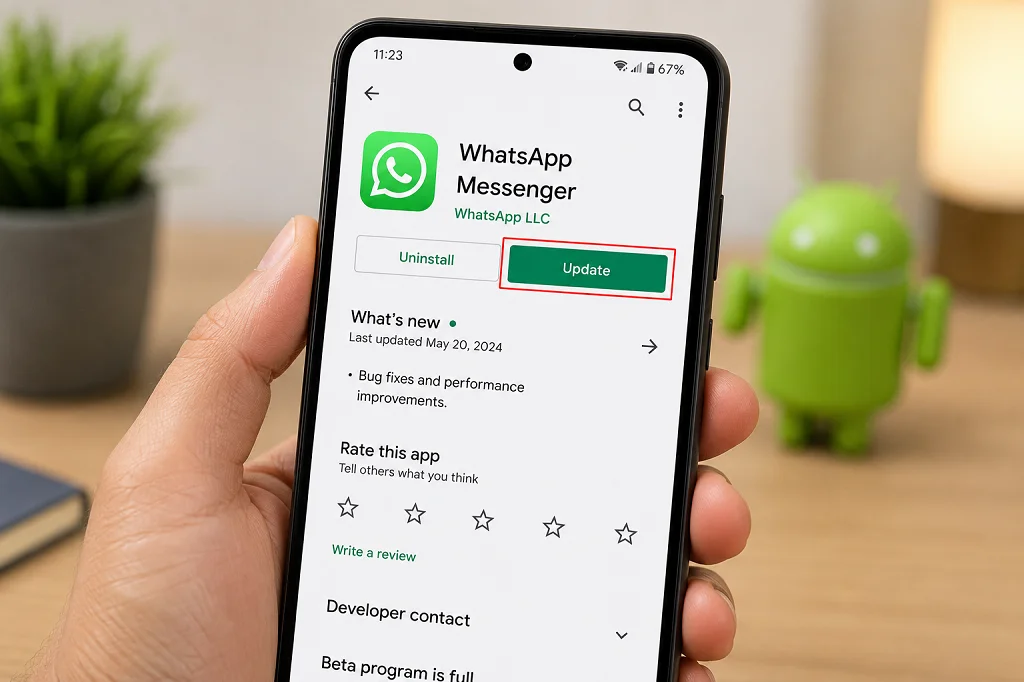
Follow these simple steps to install the New WhatsApp Update on Android:
Step 1: Open the Google Play Store
Unlock your Android phone and launch the Google Play Store.
Step 2: Search for WhatsApp
Type WhatsApp into the search bar and select the official app developed by WhatsApp LLC.
Step 3: Check for an Available Update
If a newer version is available, an Update button will appear. Tap it to begin downloading and installing the latest version. If you see Open instead, your app is already up to date.
Step 4: Wait for the Installation to Finish
The update will download and install automatically. The time required depends on your internet connection and the size of the update.
Step 5: Open WhatsApp
Once the installation is complete, open WhatsApp and start using the latest features and improvements.
Tip: Connect to a stable Wi-Fi network and ensure your device has enough storage space before updating to avoid installation issues.
How to Get the New WhatsApp Update on iPhone?
Updating WhatsApp on an iPhone is simple and only takes a few minutes. Apple distributes WhatsApp updates through the App Store, making it the safest and most reliable way to install the latest version. By keeping WhatsApp updated, we can enjoy new features, improved security, and better overall performance.
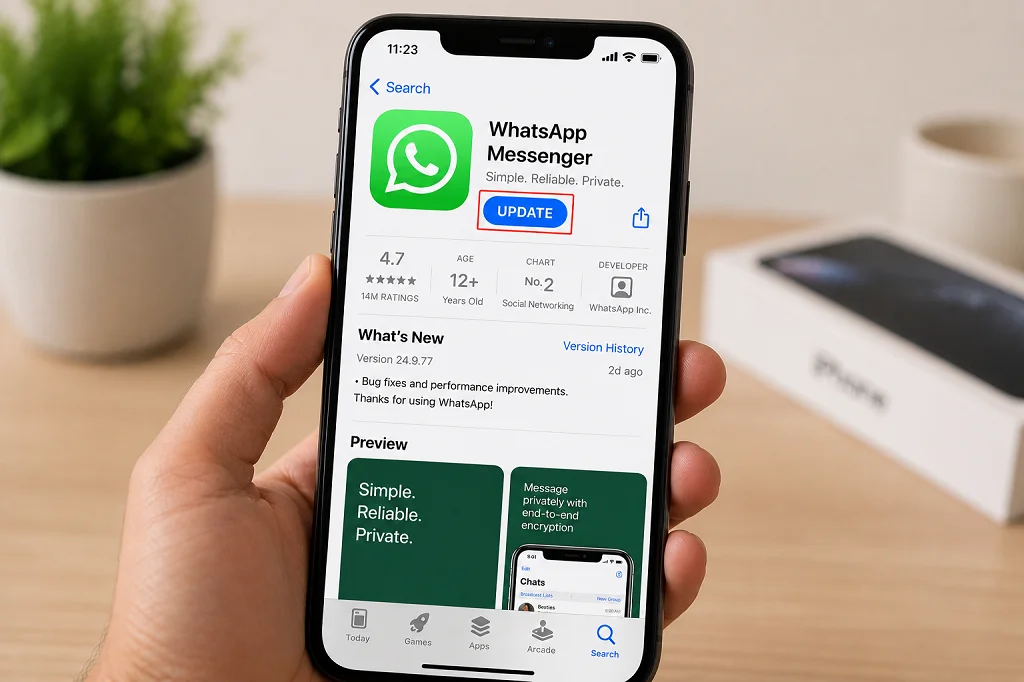
Follow these steps to get the New WhatsApp Update on your iPhone:
Step 1: Open the App Store
Unlock your iPhone and launch the App Store.
Step 2: Tap Your Profile Icon
Tap your profile picture in the top-right corner to view available app updates.
Step 3: Check for WhatsApp Updates
Scroll down to the Available Updates section and look for WhatsApp. If an update is available, an Update button will appear next to the app.
Step 4: Tap Update
Tap Update and wait while the App Store downloads and installs the latest version. You may be asked to authenticate using Face ID, Touch ID, or your Apple ID password.
Step 5: Open WhatsApp
Once the installation is complete, launch WhatsApp and start using the latest features, security enhancements, and performance improvements.
Tip: Enable automatic app updates in your iPhone settings so WhatsApp stays up to date without requiring manual checks.
How to Enable Automatic WhatsApp Updates?
Enabling automatic updates is the easiest way to keep WhatsApp up to date without checking the app stores manually. Once enabled, your device will automatically download and install the New WhatsApp Update whenever a new version becomes available, ensuring you always have the latest features, security patches, and bug fixes.
On Android
- Open the Google Play Store.
- Search for WhatsApp and open its app page.
- Tap the three-dot menu in the top-right corner.
- Check Enable Auto Update.
Alternatively, you can enable automatic updates for all apps by going to Google Play Store > Settings > Network Preferences > Auto-update apps.
On iPhone
- Open the Settings app.
- Tap Apps, then App Store.
- Turn on App Updates under Automatic Downloads.
Once enabled, your iPhone will automatically install WhatsApp updates when they become available, helping you stay up to date with minimal effort.
How to Check Your Current WhatsApp Version?
Knowing your current WhatsApp version can help you confirm whether you have installed the New WhatsApp Update or determine if a newer version is available. This is especially useful when troubleshooting issues or checking if your device supports recently released features.
On Android
- Open WhatsApp.
- Tap the three-dot menu in the top-right corner.
- Select Settings.
- Tap Help.
- Choose App Info.
Your current WhatsApp version number will be displayed on this screen.
On iPhone
- Open WhatsApp.
- Tap Settings at the bottom of the screen.
- Select Help.
The installed WhatsApp version will appear at the top or bottom of the Help page, depending on your app version.
Tip: If your version is older than the one available in the Google Play Store or Apple App Store, simply update the app to enjoy the latest features, security improvements, and bug fixes.
New Features Commonly Included in WhatsApp Updates
Every New WhatsApp Update may introduce new features or improve existing ones to make messaging more secure, convenient, and enjoyable. While some updates add major tools, others focus on enhancing performance, fixing bugs, and improving the overall user experience.
Some of the most common features included in WhatsApp updates are:
Enhanced Privacy Features
WhatsApp regularly strengthens user privacy by introducing features such as Chat Lock improvements, disappearing messages, advanced privacy settings, and stronger protection for personal conversations.
Improved Messaging Tools
Updates often bring new messaging capabilities, including message editing, improved reactions, better search functionality, richer text formatting, and easier ways to organize chats.
Better Voice and Video Calls
Many updates enhance call quality with clearer audio, improved video performance, reduced connection issues, and new calling features such as screen sharing or additional participant support.
Media Sharing Improvements
WhatsApp frequently improves how users share photos, videos, documents, and voice messages by increasing quality, speeding up transfers, and adding new editing options.
Channels and Communities Enhancements
Updates may expand features for WhatsApp Channels and Communities, offering better management tools, improved announcements, event creation, and enhanced admin controls.
Performance and Security Updates
Not every update includes visible changes. Many releases focus on fixing bugs, improving app stability, optimizing battery usage, increasing speed, and applying important security patches to keep user data safe.
Why the New WhatsApp Update Is Not Showing?
Sometimes the New WhatsApp Update may not appear immediately, even when a new version has been announced. This is usually normal, as WhatsApp often releases updates gradually across different countries, devices, and app stores. In other cases, device compatibility or technical issues may prevent the update from appearing.
Some of the most common reasons include:
| Reason | Explanation |
|---|---|
| Gradual rollout | WhatsApp releases updates in phases, so they may reach users at different times. |
| Device incompatibility | Older Android phones or iPhones may not support the latest version. |
| Outdated operating system | Your device may need a newer version of Android or iOS before WhatsApp can be updated. |
| App Store or Play Store delay | Sometimes the update takes time to appear in the Google Play Store or Apple App Store. |
| Poor internet connection | A slow or unstable connection can prevent the app store from refreshing available updates. |
| Insufficient storage space | Your device may not have enough free storage to download and install the update. |
If the update is not available, wait a day or two and check again. You can also refresh the app store, restart your device, or ensure your phone’s operating system is up to date. In most cases, the New WhatsApp Update becomes available automatically once the rollout reaches your device.
How to Fix WhatsApp Update Problems?
If you’re unable to install the New WhatsApp Update, don’t worry. Most update issues are caused by temporary problems such as a poor internet connection, insufficient storage, or an outdated operating system. Fortunately, these problems can usually be resolved with a few simple steps.
Restart Your Device
A quick restart can fix temporary software glitches that may be preventing the update from installing.
Check Your Internet Connection
Make sure you’re connected to a stable Wi-Fi network or have a reliable mobile data connection. A weak or unstable connection can interrupt the download.
Free Up Storage Space
WhatsApp updates require available storage. Delete unused apps, old photos, videos, or other unnecessary files if your device is running low on space.
Update Your Operating System
Older versions of Android or iOS may not support the newest WhatsApp release. Check for any available system updates and install them before updating WhatsApp.
Refresh the App Store
If the update isn’t showing, close and reopen the Google Play Store or Apple App Store, then search for WhatsApp again. This may refresh the available updates.
Clear Google Play Store Cache (Android)
Android users can clear the Google Play Store cache by going to Settings > Apps > Google Play Store > Storage > Clear Cache. This often resolves update-related issues.
Reinstall WhatsApp
If none of the above methods work, back up your chats first, then uninstall and reinstall WhatsApp from the official app store. After reinstalling, restore your backup to recover your messages.
Tip: Always download WhatsApp from the official Google Play Store or Apple App Store to ensure you receive authentic updates and the latest security protections.
How Much Storage Does a WhatsApp Update Need?
The amount of storage required for the New WhatsApp Update depends on your device, operating system, and the size of the update. While most updates are relatively small, your phone should have additional free space to download, install, and complete the update successfully.
As a general guide:
| Platform | Typical Download Size |
|---|---|
| Android | Approximately 30 MB–120 MB |
| iPhone | Approximately 40 MB–150 MB |
For the best experience, it’s recommended to keep at least 500 MB to 1 GB of free storage on your device. This provides enough space not only for the update itself but also for temporary installation files and future app data.
Tip: If you’re running low on storage, consider deleting unused apps, duplicate photos, or large videos before updating WhatsApp to avoid installation errors.
Is It Safe to Download WhatsApp From Other Websites?
In most cases, no. The safest way to get the New WhatsApp Update is through the Google Play Store on Android or the Apple App Store on iPhone. These official platforms verify apps before they are made available, helping protect users from malware, fake apps, and security threats.
Downloading WhatsApp from unofficial websites or third-party app stores can expose your device and personal data to serious risks. Modified or fake versions of WhatsApp may contain malicious software, compromise your privacy, or even lead to account suspension.
Avoid downloading WhatsApp from:
- Unofficial APK download websites
- Third-party app stores
- Modified versions such as WhatsApp Plus or GB WhatsApp
- Unknown links shared through messages or social media
For the best security and performance, always install or update WhatsApp from official sources. This ensures you receive genuine updates, the latest features, important security patches, and reliable support from WhatsApp.
Can We Join the WhatsApp Beta Program?
Yes, eligible users can join the WhatsApp Beta Program to test new features before they are released to the general public. Beta versions give early access to upcoming tools and improvements, allowing users to experience and provide feedback on features that are still being developed.
However, beta releases are intended for testing and may not be as stable as the regular version. Users may occasionally experience bugs, crashes, or unfinished features.
Benefits of Joining the Beta Program
- Get early access to upcoming WhatsApp features
- Help test new tools before their public release
- Provide feedback that can improve future updates
Things to Consider
- Beta versions may contain bugs or performance issues.
- Some features may change or be removed before the final release.
- The beta program may not always accept new participants if it has reached capacity.
If you rely on WhatsApp for everyday communication or business, the stable version is generally the better choice. However, if you enjoy trying new features and don’t mind occasional issues, joining the WhatsApp Beta Program can be a great way to experience the latest innovations before everyone else.
Differences Between Stable and Beta Versions
WhatsApp offers both stable and beta versions of its app. The stable version is intended for everyday users and undergoes extensive testing before release, while the beta version provides early access to upcoming features that are still being tested.
The following comparison highlights the key differences:
| Feature | Stable Version | Beta Version |
|---|---|---|
| Purpose | Daily use with tested features | Testing upcoming features before public release |
| Stability | Highly stable and reliable | May contain bugs or performance issues |
| New Features | Available after official release | Early access to experimental features |
| Performance | Optimized for most users | Performance may vary between updates |
| Best For | General users and businesses | Enthusiasts, developers, and feature testers |
| Update Frequency | Regular scheduled updates | More frequent testing updates |
For most users, the stable version is the recommended choice because it offers the best balance of reliability, security, and performance. The beta version is ideal for those who want to explore new features early and are comfortable dealing with occasional bugs or unfinished functionality.
How Often Does WhatsApp Release Updates?
WhatsApp does not follow a fixed update schedule. Instead, it releases updates throughout the year whenever new features, security improvements, bug fixes, or performance enhancements are ready. Some updates are small and focus on stability, while others introduce major features that improve the overall user experience.
In general, WhatsApp may release updates several times each month. Critical security patches can also be rolled out at any time to address important issues quickly. Additionally, some new features are introduced gradually, meaning users may receive them days or even weeks after installing the New WhatsApp Update.
Common reasons for WhatsApp updates include:
- Introducing new messaging and calling features
- Improving privacy and security
- Fixing bugs and app crashes
- Enhancing performance and battery efficiency
- Ensuring compatibility with the latest Android and iOS versions
To avoid missing important improvements, it’s a good idea to enable automatic updates so your device always installs the New WhatsApp Update as soon as it becomes available.
Also read: WhatsApp Business AI Agent: New Features, Setup & Benefits
Signs That We Should Update WhatsApp Immediately
While it’s always a good idea to keep WhatsApp up to date, certain situations indicate that installing the New WhatsApp Update should be a priority. Updating promptly can help resolve technical issues, improve security, and ensure access to the newest features.
Some common signs that it’s time to update WhatsApp include:
- The app crashes or freezes frequently.
- Messages fail to send or receive properly.
- Voice or video calls experience poor quality or connection issues.
- You receive a notification that a new WhatsApp update is available.
- New features that others are using are missing from your app.
- WhatsApp displays compatibility or support warnings.
- Your device has recently been updated to a newer version of Android or iOS.
Updating WhatsApp as soon as possible helps keep the app secure, improves overall performance, and ensures you continue to enjoy a smooth and reliable messaging experience.
Tips for a Smooth WhatsApp Update
Following a few simple best practices can help ensure the New WhatsApp Update installs quickly and without any issues. These tips can also reduce the chances of update failures or interruptions.
- Use a stable Wi-Fi connection or a reliable mobile data network.
- Keep at least 500 MB to 1 GB of free storage available on your device.
- Back up your WhatsApp chats regularly before major updates.
- Keep your Android or iPhone operating system up to date.
- Enable automatic app updates to receive new versions as soon as they are released.
- Download WhatsApp only from the official Google Play Store or Apple App Store.
- Restart your device if the update is taking too long or encounters an error.
By following these simple tips, you can install the New WhatsApp Update smoothly and enjoy the newest features, improved security, and better overall performance with minimal hassle.
Also read: WhatsApp Web Voice and Video Calls: New Upgrade 2026
Frequently Asked Questions
How do we know if WhatsApp is fully updated?
Open the app page in the Google Play Store or Apple App Store. If the button shows Open instead of Update, the latest version available for our device is already installed.
Why do some users receive new WhatsApp features before others?
WhatsApp often releases features gradually. Even after installing the latest version, new tools may appear over several days or weeks depending on the rollout schedule and region.
Will updating WhatsApp delete chats?
No. A normal update does not remove messages, photos, or contacts. Even so, creating a recent backup before major updates is always a good precaution.
Can an old phone receive the New WhatsApp update?
Only if the device still meets WhatsApp’s minimum operating system requirements. Very old Android phones and iPhones may eventually stop receiving updates.
Is automatic updating recommended?
Yes. Automatic updates provide faster access to security patches, bug fixes, and new features without requiring manual checks.
What happens if we never update WhatsApp?
Over time, older versions may experience bugs, lose compatibility with newer operating systems, miss important security improvements, or eventually stop working if support ends.
Final Thoughts
Installing the New WhatsApp Update is one of the simplest yet most effective ways to keep our messaging experience secure, reliable, and feature-rich. Whether we use Android or iPhone, updating through the official Google Play Store or Apple App Store ensures we receive verified software, improved performance, stronger privacy protections, and access to the newest communication tools.
Enabling automatic updates is the easiest long-term solution, as it helps us stay current without manually checking for every release. If an update does not appear immediately, patience is often the best approach because WhatsApp commonly rolls out new versions and features in stages across different regions and devices.
By keeping our device software current, maintaining sufficient storage space, backing up chats regularly, and relying only on official sources, we can enjoy every Latest WhatsApp Update with confidence while ensuring a smooth, secure, and up-to-date messaging experience.
Also read: WhatsApp Username Feature: Everything We Need to Know


