
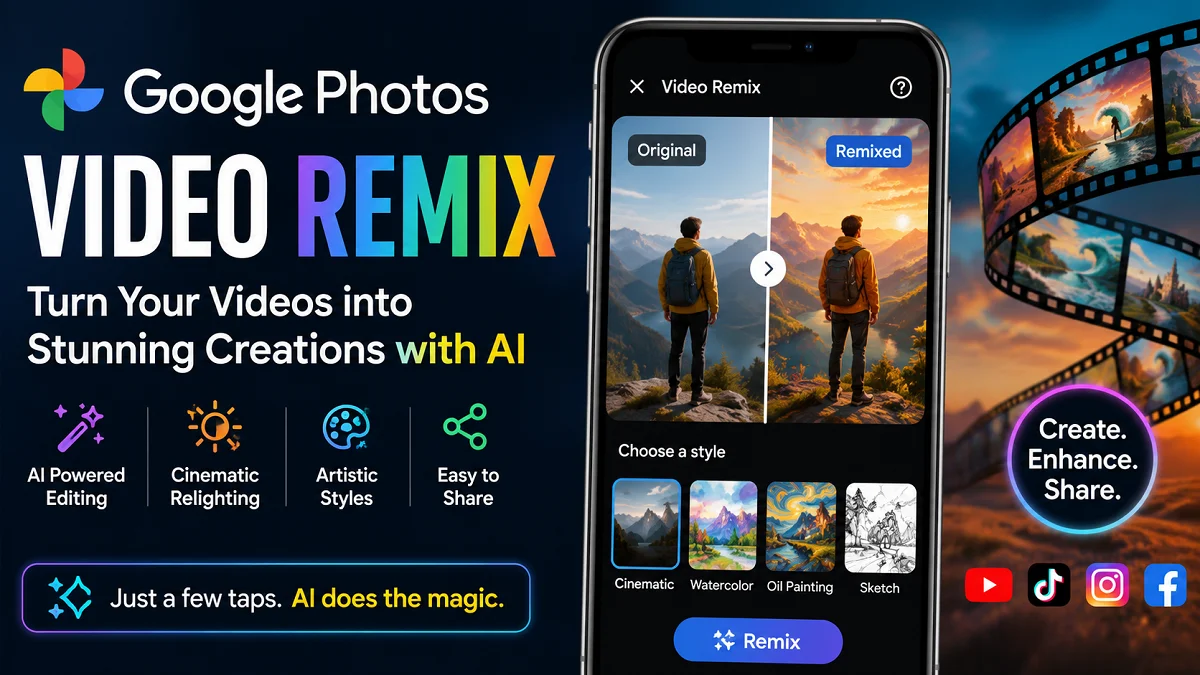
Google Photos Video Remix: Everything You Need to Know
Creating professional-looking videos no longer requires expensive editing software or advanced editing skills. Google Photos Video Remix is a new AI-powered feature that allows users to transform ordinary videos into creative, eye-catching clips with just a few taps.
Whether you are a YouTube creator, TikTok influencer, Instagram Reels maker, or someone who simply enjoys sharing videos with family and friends, this feature can save time while producing impressive results.
What Is Google Photos Video Remix?
Google Photos Video Remix is a new AI-powered video editing feature that lets users transform ordinary videos into creative, eye-catching clips with just a few taps. Instead of manually editing footage, the feature uses Google’s Gemini Omni AI model to analyze your video and automatically apply cinematic lighting, artistic styles, and other visual enhancements.
Unlike traditional video editing software, Video Remix is designed to be simple and beginner-friendly. You don’t need advanced editing skills or experience. Simply select a video from your Google Photos library, choose an AI style, and let the system create a new version within moments.
The feature is built directly into the Google Photos app, so there is no need to install separate editing software. It is especially useful for creating content for platforms such as YouTube Shorts, TikTok, Instagram Reels, Facebook Reels, and Snapchat, where visually engaging videos can attract more viewers.
Some of the key features of Google Photos Video Remix include:
- AI cinematic relighting to improve lighting and mood.
- Artistic effects such as watercolor, oil painting, and sketchbook styles.
- Creative background transformations for a fresh visual look.
- Automatic color and visual enhancements to make videos more attractive.
While Video Remix is not a replacement for professional video editing software, it is an excellent tool for content creators who want to produce high-quality videos quickly and with minimal effort. It makes AI-powered video editing accessible to beginners while helping experienced creators save time on everyday projects.
Why Google Introduced Video Remix?
Google introduced Video Remix to make video editing faster, easier, and more accessible for everyone. As short-form video platforms like YouTube Shorts, TikTok, Instagram Reels, and Facebook Reels continue to grow, more people need simple tools to create engaging content without spending hours learning professional editing software.
By using the power of Gemini Omni AI, Video Remix can automatically enhance videos with creative effects, improved lighting, and artistic styles in just a few taps. This helps users produce high-quality videos with minimal effort, making content creation more enjoyable for beginners and experienced creators alike.
The feature also strengthens the Google Photos ecosystem by allowing users to edit, organize, and share their videos from a single app instead of relying on third-party editing software. As AI becomes a bigger part of digital creativity, Video Remix reflects Google’s goal of making advanced video editing tools available to everyone.
How Google Photos Video Remix Works?
Google Photos Video Remix is powered by Gemini Omni, Google’s advanced AI model that understands and processes video content. Instead of simply applying a filter, the AI analyzes different parts of your video to create a more polished and creative version.
When you select a video, the AI examines several elements, including:
- Subject detection to identify people, animals, or objects.
- Lighting conditions to improve brightness and mood.
- Colors and contrast for a more vibrant appearance.
- Movement and camera angles to enhance the overall visual flow.
- Background details to apply creative transformations where supported.
After analyzing the footage, the AI automatically applies the selected style or effect. Depending on your choice, it can:
- Add cinematic lighting effects.
- Apply artistic styles such as watercolor or oil painting.
- Enhance colors and overall image quality.
- Transform the video’s visual appearance with AI-generated effects.
Once the processing is complete, you can preview the remixed video, save it to your Google Photos library, or share it directly on platforms like YouTube Shorts, TikTok, Instagram Reels, and Facebook Reels. The entire process takes just a few taps, making it a fast and convenient way to create engaging videos without advanced editing skills.
Main Features of Google Photos Video Remix
Google Photos Video Remix includes several AI-powered tools that help users create more engaging and professional-looking videos without manual editing. Here are its standout features:
AI Cinematic Relighting
Poor lighting can make even a great video look dull. Video Remix uses AI to automatically adjust the lighting and create a more cinematic appearance.
With this feature, you can:
- Brighten dark or underexposed videos.
- Add a warm morning or golden-hour glow.
- Improve the overall mood and atmosphere.
- Make subjects stand out more clearly.
This is especially useful for indoor recordings or videos captured in low-light conditions.
Artistic Video Styles
Video Remix offers creative artistic effects that can completely change the look of your videos.
Available styles include:
- Watercolor painting
- Oil painting
- Sketchbook drawing
- Other AI-generated artistic effects
These styles are ideal for creating unique social media content or adding a creative touch to personal videos.
Background Transformation
The AI can creatively transform the background of your video to give it a fresh and more visually appealing look.
For example, it may:
- Replace a plain background with a more attractive scene.
- Add a cinematic environment.
- Create a more immersive visual effect.
The final result depends on the original video and the selected AI style.
Automatic Video Enhancements
Instead of manually adjusting editing settings, Video Remix automatically improves your video by enhancing:
- Colors
- Brightness
- Contrast
- Visual quality
- Overall appearance
These automatic enhancements help videos look more polished with minimal effort.
One-Tap AI Editing
One of the biggest advantages of Video Remix is its simplicity. Most edits require only a few taps.
Simply:
- Select a video.
- Choose an AI style.
- Let Gemini Omni process the clip.
- Preview and save the final result.
This quick workflow makes Video Remix an excellent tool for YouTube creators, social media influencers, and anyone who wants to create high-quality videos without spending hours editing.
How to Use Google Photos Video Remix?
Using Google Photos Video Remix is simple, even if you have no previous video editing experience. Once you have access to the feature, follow these steps to transform your videos with AI.
Step 1: Update Google Photos
Make sure you are using the latest version of the Google Photos app. Updating the app ensures you have access to the newest features, including Video Remix.
Step 2: Sign In to Your Google Account
Open Google Photos and sign in with the Google account that has an eligible Google AI Plus, Pro, or Ultra subscription.
Step 3: Open the Create Tab
Go to the Create tab in Google Photos and look for the Video Remix option. If you don’t see it, the feature may not have rolled out to your account or region yet.
Step 4: Select a Video
Choose the video you want to edit from your Google Photos library. For the best results, use a clear, well-lit video with a stable camera.
Step 5: Choose an AI Style
Select the effect or style you want to apply. Depending on availability, you may see options such as:
- Cinematic relighting
- Watercolor
- Oil painting
- Sketchbook
- Other AI-generated creative styles
Step 6: Let AI Process Your Video
After selecting a style, Gemini Omni will analyze your video and generate a remixed version. The processing time may vary depending on:
- Video length
- Video resolution
- Internet connection
- Server demand
Step 7: Preview the Result
Once processing is complete, watch the remixed video to see how the AI has transformed it. If you’re not satisfied, you can try a different style for a new look.
Step 8: Save or Share Your Video
When you’re happy with the final result, save the edited video to your library or share it directly on platforms such as YouTube Shorts, TikTok, Instagram Reels, Facebook Reels, or Snapchat.
Tips for Better Results
To get the most out of Google Photos Video Remix:
- Record videos in good lighting whenever possible.
- Keep the camera steady to reduce unwanted motion.
- Use high-resolution videos for sharper results.
- Experiment with different AI styles to find the one that best matches your content.
- Always preview the final video before sharing it online.
Who Can Use Google Photos Video Remix?
At launch, Google Photos Video Remix is available to eligible Google AI subscribers in supported countries. The feature is currently not available to all Google Photos users, as Google is rolling it out gradually.
To use Video Remix, you generally need:
- An active Google AI Plus, Google AI Pro, or Google AI Ultra subscription.
- The latest version of the Google Photos app.
- A supported Google account in an eligible country or region.
- A compatible Android or iOS device with internet access.
Who Is Video Remix Best For?
Google Photos Video Remix is designed for a wide range of users, including:
- YouTube creators producing Shorts or regular video content.
- TikTok and Instagram creators who want eye-catching videos with minimal editing.
- Small business owners creating product promotions and marketing videos.
- Travel vloggers looking to give their footage a cinematic look.
- Families and casual users who want to make everyday memories more creative.
- Beginners who need an easy-to-use AI video editor without learning complex editing software.
If you don’t see the Video Remix option yet, don’t worry. Google is expected to expand its availability to more users and regions over time through future updates.
Countries Where Video Remix Is Available
Google Photos Video Remix is currently rolling out to eligible Google AI Plus, Pro, and Ultra subscribers in selected countries. If you live in one of these regions and have a supported subscription, you can access the feature through the Create tab in the Google Photos app.
As of now, Video Remix is available in the following countries:
- 🇺🇸 United States
- 🇦🇷 Argentina
- 🇧🇩 Bangladesh
- 🇧🇷 Brazil
- 🇨🇴 Colombia
- 🇪🇬 Egypt
- 🇮🇳 India
- 🇮🇩 Indonesia
- 🇯🇵 Japan
- 🇲🇽 Mexico
- 🇵🇰 Pakistan
- 🇵🇭 Philippines
- 🇰🇷 South Korea
- 🇹🇷 Turkey
What If Video Remix Isn’t Available in Your Country?
If you don’t see the Video Remix option, it doesn’t necessarily mean your device is unsupported. Possible reasons include:
- The feature has not yet rolled out in your region.
- Your Google account is not subscribed to an eligible Google AI plan.
- You’re using an older version of the Google Photos app.
- The rollout has not reached your account yet, as Google is releasing the feature in phases.
Google is expected to expand Video Remix to additional countries over time, so users in unsupported regions should keep their Google Photos app updated and watch for future announcements.
Google Photos Video Remix vs Traditional Video Editors
| Feature | Google Photos Video Remix | Traditional Editors |
|---|---|---|
| AI Automation | Excellent | Limited |
| Beginner Friendly | Very Easy | Moderate to Difficult |
| Editing Speed | Very Fast | Time-Consuming |
| Manual Control | Limited | Extensive |
| Learning Curve | Minimal | High |
| Installation | Built into Google Photos | Separate Software |
| Best For | Quick social content | Professional production |
Best Uses for Video Content Creators
Google Photos Video Remix can help creators produce engaging videos in less time. Whether you’re creating content for social media or promoting a business, the AI-powered editing tools make it easy to improve your videos with just a few taps.
Here are some of the best ways to use Video Remix:
YouTube Shorts
Turn simple recordings into eye-catching YouTube Shorts by adding cinematic lighting and creative AI effects. This is ideal for daily uploads, tutorials, behind-the-scenes clips, and quick updates.
Instagram Reels
Make your Reels stand out with artistic styles and enhanced visuals. Video Remix can help create content that attracts more views and engagement without spending hours editing.
TikTok Videos
Create entertaining TikTok videos with unique AI-generated effects that grab viewers’ attention. Experiment with different styles to match your content and current trends.
Facebook Reels
Enhance your Facebook Reels with improved lighting and creative visuals, making them more appealing to your audience and increasing their shareability.
Travel and Lifestyle Content
Give your travel videos a cinematic feel by enhancing landscapes, landmarks, and everyday moments. AI effects can make your adventures look more vibrant and memorable.
Product Reviews and Unboxing Videos
If you review gadgets, fashion, beauty products, or other items, Video Remix can improve the overall look of your videos and make product demonstrations more attractive.
Small Business Marketing
Business owners can quickly create professional-looking promotional videos for social media, helping showcase products, services, special offers, or customer testimonials without hiring a video editor.
Family and Personal Memories
Transform everyday moments, birthdays, vacations, and celebrations into creative videos that are more enjoyable to watch and share with friends and family.
Educational and Tutorial Videos
Teachers, trainers, and online educators can enhance short lessons, how-to guides, and informational videos with better visuals to keep viewers engaged.
Creative Storytelling
Use artistic styles like watercolor or sketchbook effects to create unique storytelling videos, digital art projects, or creative social media posts that stand out from traditional content.
Tips to Get Better Results
While Google Photos Video Remix uses AI to handle most of the editing, the quality of your original video still plays a big role in the final result. Following a few simple best practices can help you create more impressive and professional-looking videos.
Record in Good Lighting
Natural daylight or a well-lit indoor environment allows the AI to recognize details more accurately. Although Video Remix can improve lighting, starting with a well-lit video usually produces better results.
Keep the Camera Steady
A stable video is easier for the AI to process. Use a tripod, gimbal, or hold your phone as steady as possible to reduce unwanted camera shake.
Capture High-Quality Videos
Whenever possible, record in HD or 4K resolution. Higher-quality footage gives the AI more detail to work with, resulting in sharper and more realistic edits.
Choose the Right AI Style
Different styles work better for different types of content. For example:
- Cinematic relighting for travel and lifestyle videos.
- Watercolor or oil painting for creative and artistic content.
- Sketchbook effects for storytelling or educational videos.
Try multiple styles to find the one that best matches your video.
Keep Videos Short and Focused
Short clips with a clear subject often produce the best AI-generated results. Avoid videos with too many distractions or unnecessary movement.
Review Before Sharing
Always preview the remixed video before posting it online. Check for any visual artifacts or effects that may not suit your content, and try another style if needed.
Experiment with Different Videos
Not every video will produce the same result. Testing different clips and AI styles can help you discover which combinations create the most engaging and visually appealing content.
Keep the App Updated
Google regularly improves its AI features. Updating the Google Photos app ensures you have access to the latest Video Remix improvements, new styles, and performance enhancements.
Advantages of Google Photos Video Remix
Google Photos Video Remix offers several benefits for both casual users and professional content creators. By combining powerful AI with an easy-to-use interface, it makes video editing faster and more accessible than ever.
Saves Time
One of the biggest advantages of Video Remix is its speed. Instead of spending hours editing a video manually, you can create an enhanced version in just a few taps, allowing you to publish content more quickly.
Beginner-Friendly
You don’t need any video editing experience to use Video Remix. The AI handles most of the editing automatically, making it an excellent choice for beginners who want professional-looking results without a steep learning curve.
Creates Professional-Looking Videos
With features like cinematic relighting, artistic effects, and automatic visual enhancements, Video Remix can make ordinary videos look more polished and engaging.
Built into Google Photos
Since the feature is integrated into Google Photos, there’s no need to install separate video editing apps. You can edit videos directly from your existing photo library, making the workflow faster and more convenient.
Perfect for Social Media
Video Remix is ideal for creating content for platforms such as:
- YouTube Shorts
- TikTok
- Instagram Reels
- Facebook Reels
- Snapchat
Its quick editing process helps creators maintain a consistent posting schedule.
Encourages Creativity
The AI-generated artistic styles allow users to experiment with different visual effects that would normally require advanced editing skills. This makes it easier to create unique and eye-catching content.
Easy Sharing
After editing, you can save the remixed video or share it directly from Google Photos to your favorite social media platforms, making the entire creation and publishing process smooth and efficient.
Limitations You Should Know
Although Google Photos Video Remix offers powerful AI-powered editing, it also has some limitations. Understanding these can help you set realistic expectations and decide when to use the feature.
Requires a Google AI Subscription
Video Remix is currently available only to eligible Google AI Plus, Pro, and Ultra subscribers. Free Google Photos users may not have access to the feature.
Limited Availability
The feature is rolling out gradually and is only available in selected countries. Even if you have a supported subscription, you may need to wait until it becomes available for your account.
Limited Manual Controls
Unlike professional video editing software, Video Remix does not offer detailed editing options such as trimming with precision, adding custom transitions, adjusting audio, or editing multiple clips on a timeline. It is designed for quick AI-powered edits rather than full video production.
Results May Vary
The quality of the remixed video depends on the original footage. Videos that are blurry, shaky, poorly lit, or very low resolution may not produce the best results.
Internet Connection May Be Required
Since Video Remix uses cloud-based AI processing, a stable internet connection may be needed to generate and process your videos efficiently.
Not a Replacement for Professional Editing Software
While Video Remix is excellent for creating social media content and quick edits, professional creators working on documentaries, films, or commercial projects will still benefit from advanced editing software like Adobe Premiere Pro or DaVinci Resolve for greater creative control.
How Video Remix Compares with Other AI Video Editing Tools
| Tool | Best For | Strength |
|---|---|---|
| Google Photos Video Remix | Quick mobile editing | One-tap AI transformations |
| Adobe Premiere Pro | Professional editing | Advanced creative control |
| CapCut AI Tools | Social media creators | Templates and AI effects |
| Canva AI Video Editor | Marketing videos | Easy design workflow |
| Apple Photos AI Features | Apple users | Ecosystem integration |
Is Google Photos Video Remix Good for Professional Creators?
Professional creators should view Video Remix as a productivity tool rather than a replacement for full editing software.
It works best for:
- Social media content
- Quick promotional videos
- Behind-the-scenes clips
- Daily vlogs
- Short-form content
- Personal memories
For documentaries, commercial productions, films, or advanced YouTube projects, dedicated editing software still offers far greater control over audio, color grading, transitions, visual effects, and timelines.
Many creators may use Video Remix for fast edits while continuing to rely on professional software for larger productions.
The Future of AI Video Editing
Video Remix reflects a growing trend where AI handles repetitive editing tasks while creators focus on storytelling and creativity.
In the future, we may see AI tools that can automatically:
- Create video summaries
- Generate captions
- Remove unwanted objects
- Improve audio quality
- Suggest music
- Add transitions
- Produce multiple versions for different social media platforms
As AI technology continues to evolve, content creators are likely to benefit from even faster and more powerful editing workflows.
Frequently Asked Questions
Is Google Photos Video Remix free?
No. At launch, it is available for eligible Google AI Plus, Pro, and Ultra subscribers in supported countries.
Does Video Remix replace professional video editing software?
No. It is designed for fast, AI-powered editing rather than advanced professional production.
Can beginners use Google Photos Video Remix?
Yes. The feature is specifically designed to help users create impressive videos with little or no editing experience.
Does Video Remix work on old videos?
Yes. You can select previously recorded videos stored in Google Photos and apply AI transformations to them.
Can I edit videos for YouTube Shorts using Video Remix?
Yes. The feature is well suited for enhancing short-form videos intended for YouTube Shorts, Instagram Reels, TikTok, and similar platforms.
Is Google Photos Video Remix available worldwide?
Not yet. Google is gradually rolling it out to eligible subscribers in selected countries, with more regions expected to gain access over time.
Final Thoughts
Google Photos Video Remix makes AI-powered video editing accessible to creators of all skill levels. By combining Gemini Omni with the familiar Google Photos experience, it allows users to transform ordinary clips into visually appealing videos in just a few taps.
For video content creators who publish regularly on YouTube, TikTok, Instagram Reels, or Facebook, this feature offers a fast and convenient way to enhance videos without learning complex editing software. While it is not a replacement for professional editing tools, it is an excellent option for quick, creative edits that save time and help content stand out.
Also read: Best Free AI Image Generators to Create Stunning AI Art


