
WhatsApp New Features: What’s New and How to Use Them
WhatsApp new features are focused on making the app easier to manage, easier to move between devices, and more flexible for everyday use. The latest updates include better storage controls, cross-platform chat transfer, support for two accounts on iPhone, smarter sticker suggestions, and new AI-powered writing and photo tools.
For most people, the biggest changes are practical rather than flashy. We can now manage large files inside specific chats, move chat history across platforms more easily, and keep work and personal accounts on one iPhone without carrying two phones. That makes these updates more useful than many small visual changes users often see in messaging apps.
What are the latest WhatsApp new features?
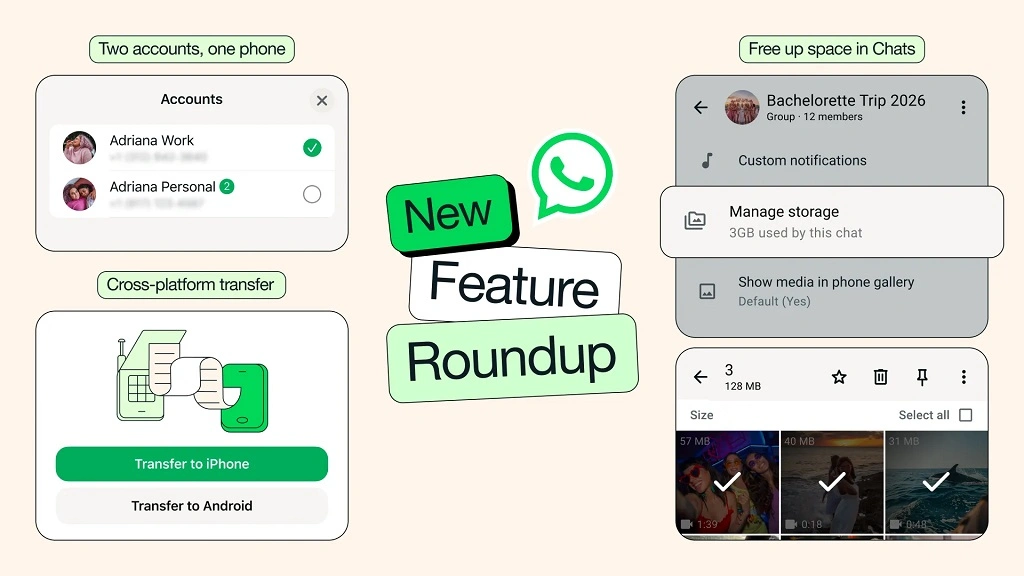
WhatsApp recently announced a feature roundup that includes six main additions: better storage cleanup inside chats, cross-platform chat transfer, two WhatsApp accounts on iPhone, emoji-based sticker suggestions, Meta AI photo touch-ups before sending, and improved AI Writing Help for suggested replies. WhatsApp says these features are rolling out now, so some users may receive them before others.
These updates matter because they solve common frustrations. Storage fills up over time, switching phones can be stressful, and many users want separate work and personal numbers on the same device. At the same time, WhatsApp is adding more creative and AI-assisted tools, though some of those features are limited by region or staged rollout.
Quick overview of the Whatsapp new features
| Feature | What it does | Who benefits most |
|---|---|---|
| In-chat storage management | Helps find and delete large files within a specific chat | Users with full storage or media-heavy chats |
| Clear media without deleting chat | Removes media while keeping conversation text | Users who want to keep chat history |
| Cross-platform chat transfer | Moves chats between iPhone and Android | People changing phone platforms |
| Two accounts on iPhone | Lets two WhatsApp accounts run on one iPhone | Users with work and personal numbers |
| Sticker suggestions | Suggests stickers when you type emojis | Users who chat casually and use stickers often |
| Meta AI photo tools | Edits photos before sending in supported regions | Users who want quick visual touch-ups |
| AI Writing Help | Suggests replies while keeping chats private | Users who want help drafting messages |
The table above combines WhatsApp’s official roundup with WhatsApp Help Center guidance on storage, chat transfer, and account switching. Feature availability still depends on app version, operating system support, and whether the rollout has reached your account.
1) Better storage management in WhatsApp
One of the most useful WhatsApp new features is the improved way to manage storage inside individual chats. WhatsApp says users can now find and delete large files directly from a chat by tapping the chat name and selecting Manage Storage. This makes cleanup more precise because we do not need to remove an entire conversation just to free up space.
WhatsApp’s Help Center also explains that storage tools are available through Settings > Storage and data > Manage storage. From there, users can review large items, forwarded items, and media taking up space. That is especially helpful if a few videos or documents are using most of the phone’s storage.
Why this matters?
Before this change, many users had to choose between keeping a cluttered chat or deleting more than they wanted. Now we can remove large media files while keeping the actual text conversation. WhatsApp also says users can clear just media when clearing a chat, which preserves chat history better than older cleanup habits.
How to use it?
On WhatsApp
- Open the chat that is using too much space.
- Tap the chat name.
- Open Manage Storage if the option appears.
- Review large files or unnecessary media.
- Delete only what you no longer need.
From settings
- Open WhatsApp Settings.
- Tap Storage and data.
- Choose Manage storage.
- Sort and review large media items.
- Delete selected files.
What most people overlook
Many users focus only on deleting chats, but media auto-download is often the real problem. If your storage keeps filling up, turning down automatic downloads can prevent the same issue from returning after cleanup. WhatsApp provides separate controls for media auto-download in storage settings.
2) Cross-platform chat transfer between iPhone and Android
For years, one of the biggest WhatsApp pain points was moving chat history from one mobile platform to another. WhatsApp now says its chat transfer feature supports moving chat history from iPhone to Android in addition to same-platform transfers. The Help Center also provides dedicated instructions for iPhone-to-Android and Android-to-iPhone moves.
This matters because changing brands or operating systems no longer has to mean losing years of conversations, photos, and videos. For many users, that alone is one of the most important WhatsApp new features in recent memory.
What can be transferred?
WhatsApp says conversations, photos, and videos can move with you during supported transfers. Help documentation also shows platform-specific methods and setup steps. However, transfer success depends on following the exact supported process rather than restoring from an unrelated backup.
How to transfer WhatsApp chats from iPhone to Android?
WhatsApp’s Help Center says users can start from the iPhone by going to Chats > Transfer chat history > Transfer to Android, then following the prompts and allowing permissions.
A simple version of the process looks like this:
- Keep both phones ready and updated.
- Open WhatsApp on the old iPhone.
- Go to the chat transfer option for Android.
- Follow the on-screen steps and permissions.
- Complete setup on the new Android phone.
Common transfer mistakes
A failed move often happens because users activate WhatsApp on the new phone too early, interrupt the process, or try to rely on an incompatible backup path. WhatsApp’s support pages note that some transfer problems require reinstalling or even factory reset steps in certain situations, so it is best to follow the official path exactly.
3) Two WhatsApp accounts on one iPhone
WhatsApp previously launched multi-account support on Android in 2023. In its new roundup, the company says the same convenience is now available on iOS, meaning users can keep two accounts logged in at the same time on one iPhone. WhatsApp adds that the profile picture will appear in the bottom tab so users can tell which account they are using.
This is a major quality-of-life improvement. Many people use one number for work and another for personal life. Carrying two phones or logging out repeatedly is inconvenient. With this update, that separation becomes simpler on iPhone.
What you need to use two accounts?
WhatsApp’s Help Center says you need a separate phone number for the second account. The original Android rollout also stated that users need a second phone number and either another SIM card or a phone that supports multi-SIM or eSIM.
How to switch accounts?
WhatsApp’s support guidance says once both accounts are registered, users can switch between them easily from within the app. Privacy and notification settings can also differ for each account, which is helpful if one account is for business and the other is private.
Important distinction: two accounts vs one account on multiple phones
These are not the same feature. WhatsApp also allows one account to be linked across multiple phones as companion devices, with up to four additional devices supported. That is different from having two separate numbers inside one app installation.
4) Sticker suggestions based on emojis
WhatsApp says it can now suggest stickers as you type emojis, making it easier to replace a simple emoji with a more expressive sticker. This is not the biggest update in practical terms, but it improves the day-to-day chat experience for users who communicate visually.
For casual users, this saves time because there is less need to search sticker packs manually. For frequent chatters, it can make messages feel more expressive without extra effort. The main limitation is that it is a convenience feature, not a core utility feature like storage cleanup or chat transfer.
5) Meta AI photo touch-ups before sending
WhatsApp says users can now use Meta AI to edit photos directly in chat before sending them. According to the official announcement, this can help remove distractions, swap backgrounds, or apply a fun style. WhatsApp also notes that Meta AI features may not be available to all users.
This feature can be useful for quick, lightweight edits. For example, we may want to clean up a distracting background before sending a family photo or give an image a different style for fun. Still, it is important to treat this as a convenience tool, not as a full photo-editing replacement.
Important caution
Availability is a real limitation here. Meta AI tools often roll out gradually and may vary by region, language, or account eligibility. Users who do not see these options should not assume something is broken. They may simply be outside the current rollout group.
6) AI Writing Help for suggested replies
WhatsApp says AI Writing Help can now draft a suggested response based on the conversation while keeping chats private. That positions the feature as an optional assistant for users who want help phrasing a reply without giving up WhatsApp’s privacy focus.
This can help in practical situations. We might need a more polished reply, a calmer response in a tense conversation, or a clearer message for work. Used carefully, it can save time and reduce the pressure of composing messages from scratch.
What to keep in mind
AI-generated wording can be useful, but it should still be reviewed before sending. Tone, nuance, and context matter. A suggested reply may sound polished while still missing the exact intention we want to communicate. That is why the best use of this feature is assistance, not blind automation. This caution is an inference based on how drafting tools work in practice, even though WhatsApp’s official note focuses on privacy and convenience.
How these WhatsApp new features compare in real life
Best features for everyday utility
Storage management, media cleanup, and cross-platform transfer are the most broadly useful changes. Almost everyone stores media, and many users eventually change phones. These updates solve practical problems rather than adding novelty alone.
Best feature for professionals and business users
Two accounts on one iPhone is especially valuable for people balancing personal and work communication. It removes friction and reduces the chance of replying from the wrong identity.
Best feature for creative or social chats
Sticker suggestions and Meta AI photo touch-ups are more lifestyle-oriented. They improve expression and presentation, but they are less essential than storage and transfer tools.
Step-by-step: how to check whether you have the WhatsApp new features
Because these features roll out gradually, the first question most users ask is simple: how do we know whether they are available?
Check your app version
Go to your app store and make sure WhatsApp is updated to the latest available version for your device. Feature rollouts often require a newer app build. This is general best practice rather than a quoted WhatsApp instruction.
Check the relevant menu
Open the part of WhatsApp where the feature should appear:
- Storage tools: check Settings > Storage and data or a specific chat’s info page.
- Transfer tools: check Chats settings.
- Multiple accounts: check account-switching options in settings.
Wait for staged rollout
Even on the latest version, some features may still not appear immediately. WhatsApp explicitly says recent additions are rolling out, which means availability can expand over time instead of arriving for everyone on day one.
Common mistakes users make with WhatsApp new features
Expecting instant access
A frequent mistake is assuming that every announced feature should appear immediately. In reality, staged rollout is normal, especially for AI and advanced privacy functions.
Confusing backups with transfer tools
Some users mix up cloud backup, local migration, and direct device transfer. WhatsApp treats these as different processes, and using the wrong method can lead to frustration or failed migration.
Using unofficial apps for multiple accounts
WhatsApp has previously warned users to rely on the official app rather than imitation or fake versions when trying to manage multiple accounts. That warning remains relevant because unofficial apps can create security and privacy risks.
Ignoring privacy settings after adding a second account
Each account can have separate privacy and notification settings. If users forget to review them, they may carry over habits that do not fit the purpose of the second account.
What most people overlook about WhatsApp’s recent direction
The bigger story is not only that WhatsApp keeps adding features. It is that the platform is trying to become more complete without pushing users away from privacy-first messaging. We can see that balance in features like on-device voice message transcripts, privacy-focused AI messaging language, multi-device support, and stricter account protections for high-risk users.
That means the recent WhatsApp new features are part of a broader pattern. The app is evolving from a simple messaging tool into a more capable communication platform, but it is still emphasizing end-to-end encryption, device-based processing for some tools, and stronger security controls.
FAQ about WhatsApp new features
What are the WhatsApp new features right now?
The latest official Whatsapp feature roundup includes better storage cleanup, cross-platform chat transfer, two accounts on iPhone, sticker suggestions from emojis, Meta AI photo touch-ups, and improved AI Writing Help.
Can I use two WhatsApp accounts on one iPhone now?
Yes. WhatsApp says two accounts on one phone are now available on iOS, similar to Android. You still need a separate phone number for the second account.
Can WhatsApp transfer chats from iPhone to Android?
Yes. WhatsApp says its chat transfer feature now supports iPhone-to-Android transfer in addition to same-platform moves. The Help Center provides platform-specific instructions.
Can I delete media without deleting my chat?
Yes. WhatsApp says users can clear only media files when clearing a chat, which helps preserve chat history while freeing space.
Are Meta AI features available to everyone?
Not always. WhatsApp specifically notes that Meta AI features may not be available to all users, so access can depend on rollout stage and region.
Is one account on multiple phones the same as two accounts on one phone?
No. One feature lets the same WhatsApp account link to multiple companion phones, while the other lets two separate phone numbers run in the app on one phone.
Final thoughts (Whatsapp New Features)
The most important WhatsApp new features are the ones that remove friction from real life. Storage controls help us keep the app usable, cross-platform transfer makes switching phones less painful, and dual accounts on iPhone solve a problem many users have had for years. The AI and sticker updates add convenience too, but the strongest value comes from practical improvements that make WhatsApp easier to manage every day.
If we look at the broader trend, WhatsApp is steadily becoming more capable while trying to preserve the privacy and simplicity that made it popular in the first place. That balance will likely shape future updates as well.
Also read: 10 Most Technologically Advanced Countries in the World